A business invests in a new dashboard. It promises to bring project progress, resource planning and financial reporting into one place.
Six weeks later, someone is still exporting the numbers into Excel to check whether they're right.
We've seen this happen when businesses automate their reporting before sorting out how information is captured and shared between systems.
We experienced something similar while building a resourcing dashboard for a client. The project took roughly two months, with most of that time spent getting the underlying data right. Planning sat in one system, time was logged in another, and the two weren't connected.
Building the dashboard was the easy part.
It's a problem we see with workflow automation in services businesses. Companies invest in sophisticated reporting and AI tools while the everyday processes supporting them still rely on manual updates, disconnected systems and spreadsheets.
So, where should you start?
The five layers of workflow automationWe find it useful to think about business process automation in five layers: capturing information, connecting systems, creating documents, monitoring exceptions and reporting.
Each layer depends on information being recorded and managed properly. You don't necessarily need to implement them in a strict sequence, but understanding those dependencies can save you a lot of unnecessary work.
Here's how we've approached them in our own business and with clients.
1. Capture information before it gets lostThink about the small commitments people make throughout the day.
"I'll send that over tomorrow."
"Can we add that to the next phase?"
"I'll check with the team."
These promises happen in meetings, emails and Slack conversations. Unless someone records them, they're easily forgotten.
We had the same problem. Project updates were being shared in Slack, where important details sometimes got lost.
We changed the process so updates are now recorded in monday.com, with an automation sharing them in Slack. Everyone can still follow the conversation, but the project record stays in one place.
We've also introduced Milo, our internal AI assistant. Every day at 5pm, one of our directors uses Milo to check her sent emails and Slack messages for commitments she's made. It compares them with her monday.com tasks and adds anything missing.
A useful test: Look at the last five commitments your team made to clients. Can you find all five in your project management system without asking anyone?
2. Connect systems so people stop copying informationA salesperson closes a deal in the CRM. Someone creates a project in the delivery system. Hours are logged elsewhere, and finance copies them into invoicing.
Every manual transfer creates another opportunity for errors.
System integrations can remove much of this work. For example, closing a deal in your CRM could automatically create a project in monday.com, transfer the relevant client details and notify the delivery team.
Of course, integrations aren't always as straightforward as vendors suggest.
We've tried integrating PandaDoc with monday. com more than once. APIs change, connections need maintenance and sometimes something that worked perfectly well needs fixing after an update.
Start by listing every task where someone copies information between systems. Record how often it happens and identify the most repetitive one.
Then check whether the systems can reliably match the same client or project, and whether a native integration or a tool such as Make can automate the transfer.
3. Standardise documents before asking AI to write themPreparing a statement of work used to take us three to four hours. Milo can now produce a draft in approximately ten minutes.
Our first attempts weren't particularly good.
The problem was our template. We hadn't properly defined how our project phases and deliverables should be structured, so the AI drafts were inconsistent.
Once we fixed the template, Milo could use it alongside previous statements of work and scoping call notes to produce a much more reliable draft.
A person still reviews every document before it goes to a client, particularly to check the scope and make sure we haven't promised something we can't deliver.
Before automating proposals or other routine documents, ask two people on your team to outline the same document. If their structures differ considerably, agree on a standard template first.
You'll get far better results when the AI has an established process to follow.
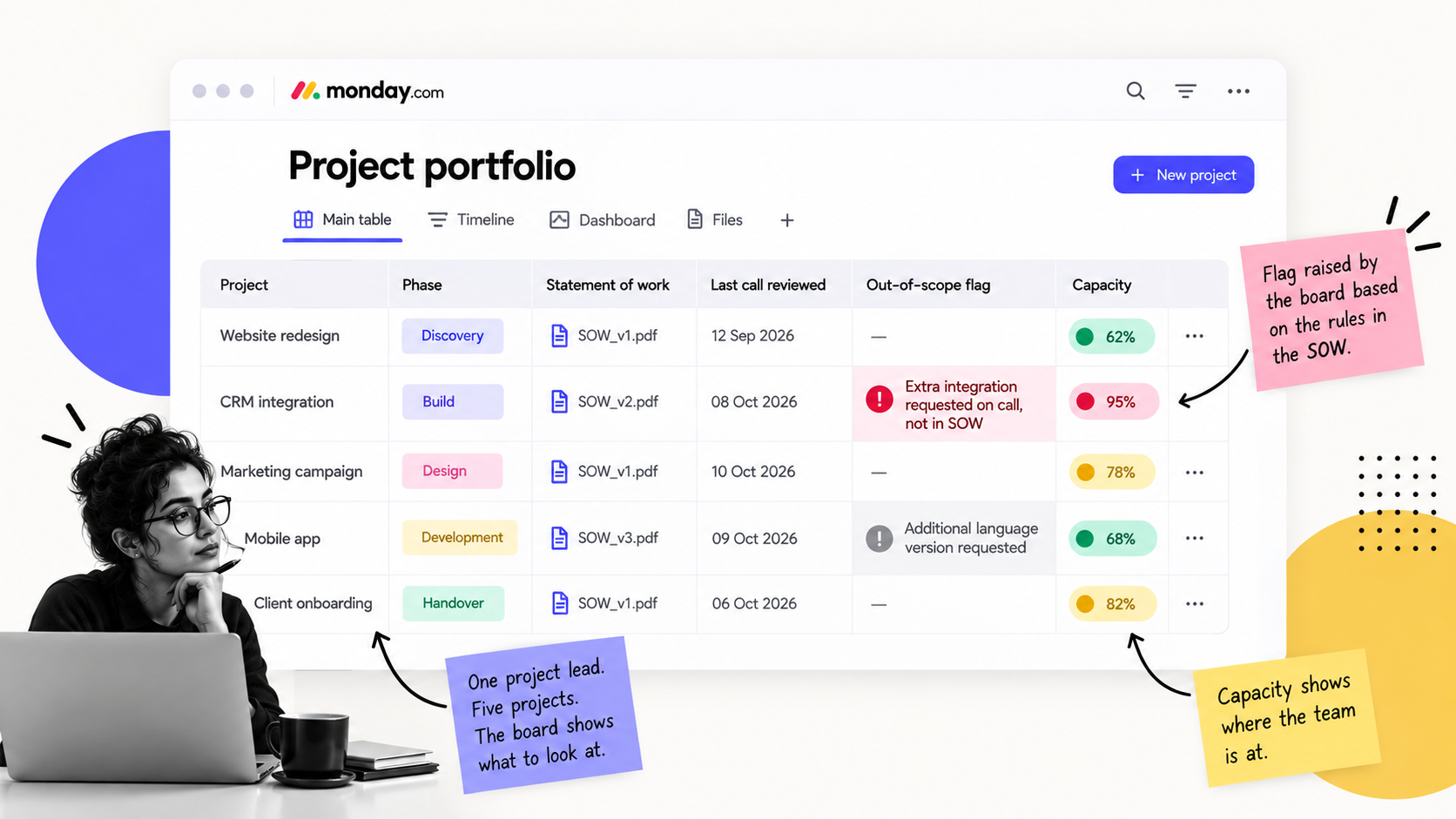
4. Automate the checks that catch problems earlyOur project leads typically manage four to five projects at once. Remembering every detail of each agreed scope becomes difficult when clients regularly discuss changes and new ideas.
So we've introduced an automated check.
Every hour, Milo reviews notes from our AI meeting notetaker and compares them with the statement of work stored in monday. com.
If something appears to be outside the agreed scope, it's flagged in red on the project board for the project lead to review.
Milo sometimes gets it wrong. A client might simply be exploring an idea. But dismissing an unnecessary flag takes seconds, while missing a genuine scope change could result in days of additional, unbilled work.
This kind of exception monitoring also works for resource management.
For example, we've used capacity bands with clients: below 75% committed capacity is green, 75–90% is amber and above 90% is red.
An automation can notify a manager when someone moves into the red band, allowing them to review workloads before assigning more work.
Think about which problems your team tends to discover too late. Then define what the system should monitor and who needs to be notified.
5. Automate reporting once you trust the informationAutomated reporting is often where businesses want to start. A dashboard promises immediate visibility of project progress, utilisation and profitability.
Consider what happens when employees record their time inconsistently, or when project and invoicing information sit in separate systems.
The dashboard may update automatically, but someone still needs to check the figures.
We're developing a weekly client status update showing hours used and hours remaining.
Before automating a report, examine where its figures come from. Who records them? How frequently are they updated? Does anyone need to correct them before the report can be shared?
If the underlying information is unreliable, that's where the work needs to begin.
Where should your business start?Look at the manual work your team is already doing.
Which information gets copied between systems? Which reports need checking against spreadsheets? What commitments regularly get missed? What problems could have been spotted earlier?
Pick a recurring problem and follow it through the business. You may find that a straightforward integration solves it. Or you may need to agree on a process, improve how information is recorded or fix a document template first.
We've had to make these changes in our own business, and we've helped clients work through similar problems. The most useful starting point is usually the process that's creating unnecessary work every week.